Saturday, April 2, 2011

Computer Tips From A Computer Guy

Computer Tips From A Computer Guy


Watch YouTube Videos in Windows Media Player

Posted: 02 Apr 2011 04:09 AM PDT

If you’ve tried to play YouTube videos or other online videos in Windows Media Player, you may have received an error that it doesn’t support the file type or the codec used to compress it. This is because Windows Media Player lacks native support to play Flash Video (FLV) files.

The best way to watch YouTube videos in Windows Media Player is to download them, then convert them to a format the Windows Media Player can play. You can do this easily with YouTube Downloader, a free software program that can download Flash Videos and convert them to other formats.

In addition to YouTube videos, YouTube Downloader will download and convert videos from Google Videos, Facebook, Metacafe, DailyMotion, Veoh, Vevo and many other popular online video sites.

Installing YouTube Downloader

Download and install the latest version of YouTube Downloader. Having the latest version is important, since YouTube occasionally makes changes that may cause YouTube Downloader to stop working.

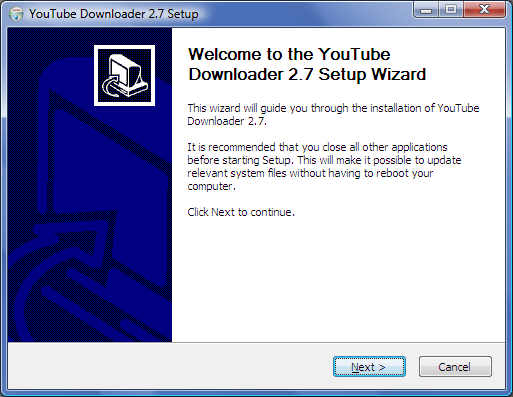
If you don’t want to install the YouTube Downloader Toolbar and McAfee Security Scan Plus and set Yahoo! as your search engines, clear the check boxes beside these options. Click Next, then click Install and Finish to complete the installation.

Install YouTube Downloader

Downloading YouTube Videos

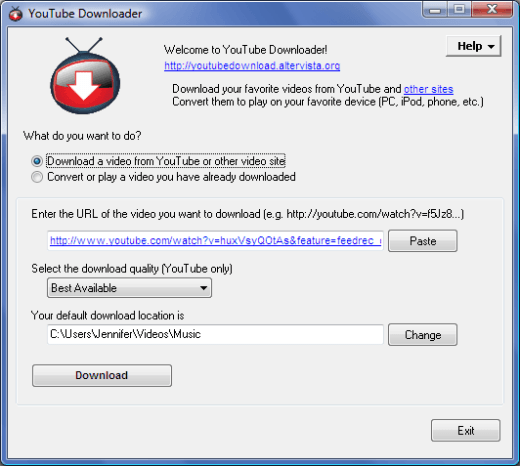
In YouTube Downloader, click the radio button beside Download a video from YouTube or other video site. In your web browser, navigate to the video you’d like to download from YouTube or another video site. Select and copy the URL from the address bar of your browser.

Select the quality you’d like for your video download. For best results, select Best Quality. Under Your default download location is, select the folder where you usually save your videos, then click the Download button and click Save. Repeat these steps for each video you'd like to download.

Download YouTube Video

Converting Video Files

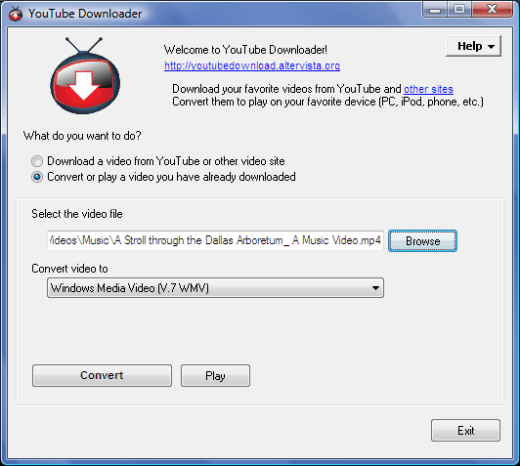
In the YouTube Downloader window, select the radio button beside Convert or play a video you have already downloaded. Under Select the video file, click Browse. Find the video file just downloaded on your hard drive, select it and click Open.

From the drop-down menu under Convert video to, select Windows Media Video (V.7 WMV), then click Convert. In the window that pops up, select the desired video quality. Choosing high will result in a better quality video with a larger file size, but it’s still your best option by far.

Only pick a lower quality if you are running out of space on your hard drive. You can also adjust the volume and cut the video in this window. When you’re finished, click OK. If you’re low on disk space, you can delete the original video download when the conversion is complete.

Convert YouTube Video to WMV Format

Opening Videos in Windows Media Player

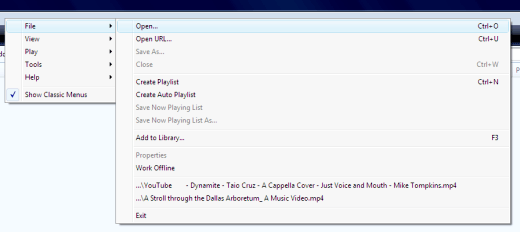
Open Windows Media Player. Right click the toolbar, then click File and Open. Navigate to the folder where your converted video is stored and click Open. If the video appears small, click the button in the lower left hand corner of the screen to enter full screen mode. When you’re finished playing the video, click the button again to exit full screen mode.

Open Video in Windows Media Player

For more information, check out Play MP4 Audio and Video Files in Windows Media Player.


Copyright © 2007
Online Tech Tips.
Aseem Kishore (digitalfingerprint: a59a56dce36427d83e23b501579944fcakmk1980 (74.125.94.90) )

Post from:

Watch YouTube Videos in Windows Media Player


Learn to Play Piano for Free with Synthesia

Posted: 01 Apr 2011 05:18 AM PDT

Synthesia is a free software program that lets you learn how to play the piano on a MIDI keyboard. If you can connect your computer to your MIDI keyboard with a MIDI or USB cable, chances are you can use this software.

Synthesia is a very lightweight program, only requiring a 1 GHz processor and 20 MB of memory to run. Your computer should also have a graphics processor with 3D hardware acceleration. Synthesia will run under Windows XP SP2, Vista and 7, as well as Mac OS X 10.4 and later.

Installing Synthesia

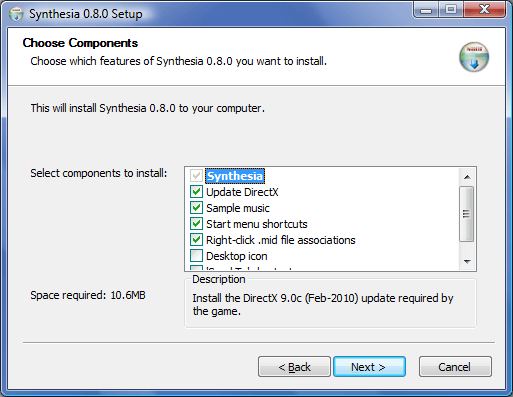
To get the latest version of Synthesia, download it directly from the SynthesiaGame.com website. When installing the program, make sure that Update DirectX, Sample music, Start menu shortcuts and Desktop icon are selected. Select Right-click .mid file associations if you want Synthesia options to appear in the right click context menu.

Install Synthesia

Choosing Video Settings

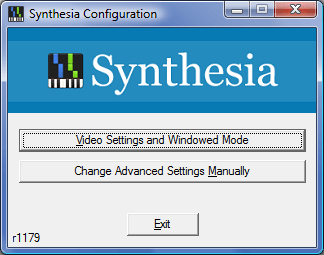
The new version of Synthesia has a configuration tool that lets you set your video settings. To set these options, click Start, All Programs and select Synthesia, then click Synthesia Configuration. Click Video Settings and Windowed Mode.

Synthesia Configuration Tool

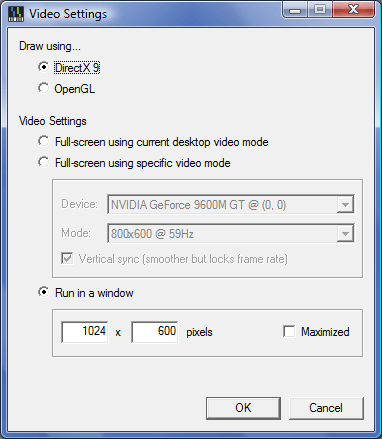
If your computer has problems drawing with DirectX, you can select OpenGL as an alternative. Under Video Settings, you can choose the button beside Full-screen using specific video mode to change Synthesia to a lower resolution. If you plan to use other applications while using Synthesia, select Run in a window, select the resolution in pixels and whether you want the window to open maximized.

Synthesia Video Settings

Getting Started with Synthesia

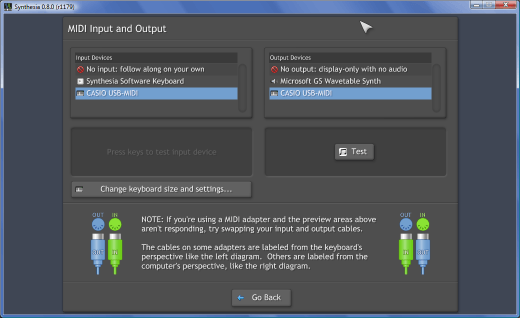
Before you start using Synthesia to learn piano, you must set up your MIDI keyboard. Connect the MIDI keyboard to the computer, then turn it on. Start Synthesia, then select Keyboard Setup.

Under both Input Devices and Output Devices, select your MIDI keyboard from the list. If your keyboard doesn’t appear in the lists, turn the keyboard off and shut Synthesia down. Turn the keyboard back on again and restart Synthesia, and your keyboard should appear in the setup window.

Synthesia Keyboard Setup

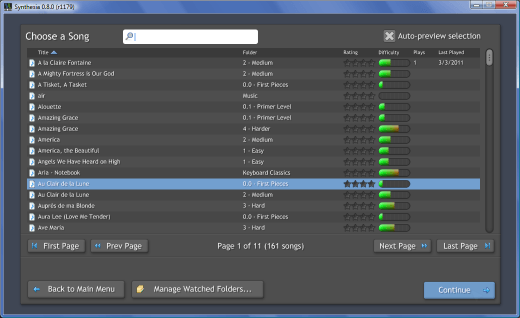
Click Go back to return to the main menu, then click Choose a song.  If you’re new to playing the piano, select a song with a rating of 0.0 First Pieces. If you already know how to play, you can select a piano piece with a higher difficulty level. Click Continue.

choosesong

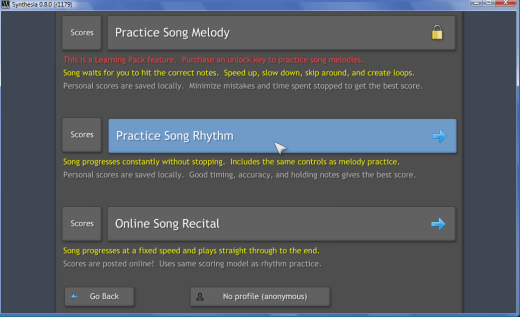
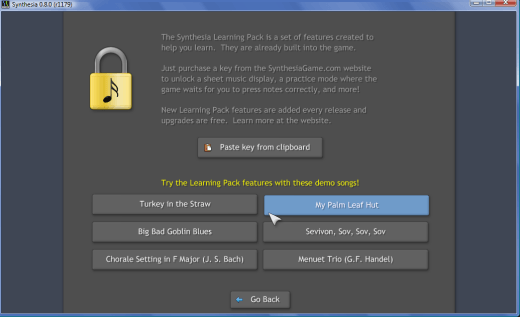
In the free version of the software, most of the MIDI songs allow only two practice modes; Practice Song Rhythm and Online Song Recital. The Practice Song Melody feature, which waits for you to press the correct key before continuing with the song, is unlocked when you purchase the Learning Pack from Synthesia.

However, there is a Learning Pack Demo in Synthesia that lets you try this feature out on six different songs. There are also ways to configure the Practice Song Rhythm feature to make the songs easier to learn.

practicesongrhythm

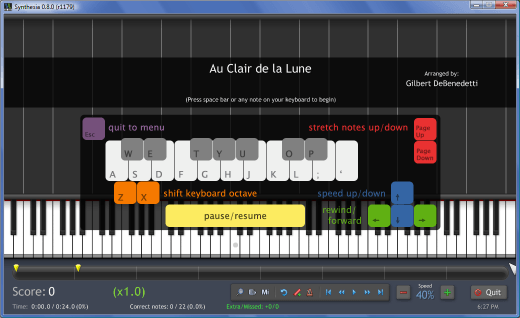
Select Practice Song Rhythm, then right click the song and choose Played by You. You can also change the MIDI instrument, if you like. Click Continue, and adjust the song speed down to a speed you can play.

When you’re just getting started using Synthesia, it’s best to reduce the speed to around 30 to 40 percent. In the toolbar at the bottom of the window, you can also change the keyboard zoom, show labels on falling notes, show labels on keys, set the song to loop, set and edit bookmarks and set the metronome. You can also pause the song, rewind or fast forward it and jump back or forward to bookmarks within the song.

Synthesia Song Settings

Playing Songs

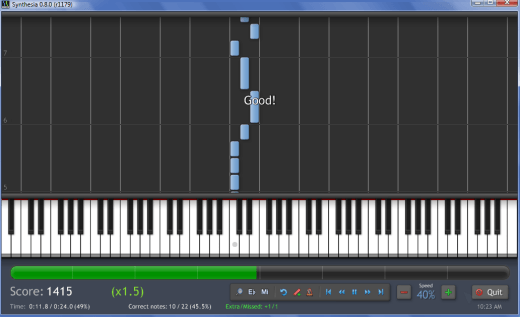
Make sure the computer monitor is within a comfortable viewing distance and angle from your MIDI keyboard. Press the spacebar on your computer or press any key on the keyboard to start the song playing.

Play the blue notes with your left hand and the green notes with your right hand. Match the notes on the screen as closely as possible. When you finish playing a song, Synthesia will show you a score screen that shows how well you played.

Play Piano Song

Learning Pack Demo

In the Learning Pack Demo, you can try out features that aren’t included with the free version of Synthesia. Select a song and select Played by You on both the green and blue bars. You can also select Sheet Music, which is another Learning Pack feature.

Click Continue and then Practice Song Melody to begin practicing the song. You can play the song at any speed that you feel comfortable with, and Synthesia will wait for you to press the next note.

Synthesia Learning Pack Demo

To learn more, read about MIDI and MIDI composition and recording software.


Copyright © 2007
Online Tech Tips.
Aseem Kishore (digitalfingerprint: a59a56dce36427d83e23b501579944fcakmk1980 (74.125.94.90) )

Post from:

Learn to Play Piano for Free with Synthesia


eHow of the Day | eHow.com

eHow of the Day

Freshen your home surroundings and add a pleasant aroma to the air by making your own room oil. You can blend your own signature scents to complement any occasion or decor theme. From sweet or citrus-fresh to festive and spiced, homemade room scent oils are easy to make. Room fragrance oils are useful in reed diffuser setups and oil warming kits.…keep reading

More Like This
New on eHow
ADVERTISEMENT
You Should Follow Us

Friday, April 1, 2011

April Fools: ProPakistani

April Fools: ProPakistani

Link to Pro Pakistani

April Fools

Posted: 01 Apr 2011 01:05 PM PDT


April Fools is a post from: ProPakistani

This year, like every year, the internet embraced April fools day and as usual, major tech companies and websites shocked people who didn't realize what the date was. So without further ado, I present the better pranks pulled off this year:

Australia to get 2022 World Cup, FIFA descends into chaos:

Sport news website "The roar" had quite a few people going with this one. The article stated that FIFA had some internal disputes and Qatar had been stripped of its World Cup hosting rights. Instead Australia had been given the right to host World Cup 2022. Here's the posted article:

http://www.theroar.com.au/2011/04/01/australia-to-get-2022-world-cup-fifa-descends-into-chaos/

Google’s Hiring Autocompleter:

Google always comes up with the better jokes every year and this year was no exception. Turns out, Google autcomplete feature is powered by people. And you can be one of them! You are eligible if your typing speed is around 32,000 words per minute, and you are willing to travel to far off places to learn local trends. Here's a video of life as an autocompleter.

Another one from Google is the new Gmail Motion feature which uses body gestures to control everything in Gmail, as is demonstrated below:

Groupon patents April fools day:

Keeping in line with companies applying for crazy patents in the industry, Groupon decided to patent April fools day.

"For centuries, April Fools' Day's intellectual trademark ownership has been uncertain. That's why we are proud to announce our patent application for April Fools’ Day. Everyone’s favorite day of daffiness finally has a new owner—Groupon!"

Here's the page where they announced it:

http://www.groupon.com/pages/april-fools

A pen that tweets as you write! :

clip image002 April Fools

"Artline" have revolutionized the industry with the release of the world's first Twitter pen. This piece of equipment can twitter whatever you are writing through the use of a series of accelerometers and a small camera mounted in the barrel track the pen's movements and translates that into characters. A specially designed 4th generation microchip allows the pen access to your Twitter account, updating it instantly.

http://www.artline.com.au/flash.aspx


YouTube:

YouTube posted the top 5 viral pictures of 1911, complete with grainy black and white film. It's a collection of actual viral videos these days by the way for the YouTube newbies.

Kodak:

Kodak really got into the groove this year. They offered an app for removing a specific person from all of your photos and videos regardless of their location. Super creative stuff.

http://www.kodak.com/eknec/PageQuerier.jhtml?pq-path=2/6868&pq-locale=en_US&_requestid=16712

Share funny pranks you've come across the web in the comments!

Related posts:

Copyright © 2010 ProPakistani.PK

This posting includes an audio/video/photo media file: Download Now

Ufone’s Super Call Offer is Back

Posted: 01 Apr 2011 07:36 AM PDT


Ufone’s Super Call Offer is Back is a post from: ProPakistani

Super Call Offer Ufones Super Call Offer is BackUfone has gone aggressive recently, with back to back plentiful of offerings in last few days.

Latest addition is the Super all Offer, which remained Ufone's major weapon for retaining customers and for getting new customers in last one year or so.

Once again, Ufone has brought its Super Call Offer back for its customers, with little variation though.

Super Call Offer Details:

With Super Call Offer, Ufone customers can make hourly calls:

  • Make Ufone to Ufone calls from 10:00 pm to 7:00 pm the next day at Rs. 2.99 plus tax
  • There is no daily charge for Super Call Offer

How to Subscribe:

  • To activate Super Call Offer, simply dial *45#
  • One time activation charges are Rs. 20 plus tax

Terms & Conditions:

  • One time subscription charges are Rs.20+tax
  • This offer is valid for Lady's Package, UWON, UWON Plus, Tension Free Special Package, Public Demand, Josh and Uth Packages
  • This rate also applies to Ufone Friends & Family
  • This facility is not available on Bundle Offer calls.
  • The maximum duration of a call is 59:59 minutes.
  • Customers existing package rate applies from 7pm to 10pm.
  • Daily charges will continue to apply on existing package of customers.
  • 19.5% FED on usage and 11.5% withholding tax at recharge or bill applies.

Related posts:

Copyright © 2010 ProPakistani.PK

15 Colleges & Universities Rocked by Jazz Jazba Such Talent, More to Go!

Posted: 01 Apr 2011 04:32 AM PDT


15 Colleges & Universities Rocked by Jazz Jazba Such Talent, More to Go! is a post from: ProPakistani

The Jazz Jazba hunt for Such Talent commenced in February and since its beginning, it has generated extreme excitement among young students of colleges and universities all across Pakistan.

Students have been actively participating in Such Talent competitions by showing their Jazbas, may it be singing, dancing, acting or painting, playing musical instruments or doing an imaginable feat. These young students proudly present their talents on the Such Talent platform, get applauded by their friends and in the end, the one with the best and most voted Jazba takes home the prize.

So far, Jazz Jazba has visited more than 15 institutes of Karachi, Lahore and Islamabad and many other cities and in each one of these colleges and universities, hundreds of Talent nominations were received by young students.

A unanimous feedback from the young participating students was that they look forward to such activities to be organized by companies. Youth of Pakistan has so much talent and so much energy yet they hardly come across such constructive avenues whereby they can channel their energies into positive activities.

Jazz Jazba Such Talent at PAF KIET Karachi 6 thumb 15 Colleges & Universities Rocked by Jazz Jazba Such Talent, More to Go!Jazz Jazba Such Talent at PAF KIET Karachi 7 thumb 15 Colleges & Universities Rocked by Jazz Jazba Such Talent, More to Go!Jazz Jazba Such Talent at PAF KIET Karachi 9 thumb 15 Colleges & Universities Rocked by Jazz Jazba Such Talent, More to Go!Jazz Jazba Such Talent at PAF KIET Karachi 10 thumb 15 Colleges & Universities Rocked by Jazz Jazba Such Talent, More to Go!Jazz Jazba Such Talent at PAF KIET Karachi 11 thumb 15 Colleges & Universities Rocked by Jazz Jazba Such Talent, More to Go!Jazz Jazba Such Talent at PAF KIET Karachi 12 thumb 15 Colleges & Universities Rocked by Jazz Jazba Such Talent, More to Go!Jazz Jazba Such Talent at PAF KIET Karachi 8 thumb 15 Colleges & Universities Rocked by Jazz Jazba Such Talent, More to Go!Jazz Jazba Such Talent at PAF KIET Karachi 14 thumb 15 Colleges & Universities Rocked by Jazz Jazba Such Talent, More to Go!Jazz Jazba Such Talent at PAF KIET Karachi 15 thumb 15 Colleges & Universities Rocked by Jazz Jazba Such Talent, More to Go!Jazz Jazba Such Talent at PAF KIET Karachi 16 thumb 15 Colleges & Universities Rocked by Jazz Jazba Such Talent, More to Go!Jazz Jazba Such Talent at PAF KIET Karachi 17 thumb 15 Colleges & Universities Rocked by Jazz Jazba Such Talent, More to Go!Jazz Jazba Such Talent at PAF KIET Karachi 18 thumb 15 Colleges & Universities Rocked by Jazz Jazba Such Talent, More to Go!Jazz Jazba Such Talent at PAF KIET Karachi 19 thumb 15 Colleges & Universities Rocked by Jazz Jazba Such Talent, More to Go!Jazz Jazba Such Talent at PAF KIET Karachi 20 thumb 15 Colleges & Universities Rocked by Jazz Jazba Such Talent, More to Go!Jazz Jazba Such Talent at PAF KIET Karachi thumb 15 Colleges & Universities Rocked by Jazz Jazba Such Talent, More to Go!Jazz Jazba Such Talent at PAF KIET Karachi 1 thumb 15 Colleges & Universities Rocked by Jazz Jazba Such Talent, More to Go!Jazz Jazba Such Talent at PAF KIET Karachi 2 thumb 15 Colleges & Universities Rocked by Jazz Jazba Such Talent, More to Go!Jazz Jazba Such Talent at PAF KIET Karachi 3 thumb 15 Colleges & Universities Rocked by Jazz Jazba Such Talent, More to Go!Jazz Jazba Such Talent at PAF KIET Karachi 4 thumb 15 Colleges & Universities Rocked by Jazz Jazba Such Talent, More to Go!Jazz Jazba Such Talent at PAF KIET Karachi 5 thumb 15 Colleges & Universities Rocked by Jazz Jazba Such Talent, More to Go!

Related posts:

Copyright © 2010 ProPakistani.PK

Mobile Threats Double in Number

Posted: 01 Apr 2011 03:05 AM PDT


Mobile Threats Double in Number is a post from: ProPakistani

Number of malicious programs targeting mobile devices has more than doubled between August 2009 and December 2010.

In 2010, over 65% more new threats targeting mobile devices were detected than in the previous year; said a report published by Kaspersky Lab.

The growing popularity of the Android platform has inevitably drawn the cybercriminals attention: in August 2010, the first malicious program targeting Android was detected, and since then, that number has reached 15 programs from a total of 7 families.

The first threats targeting Apple’s iPhone OS also appeared during this last reporting period, but infected only devices that had been jailbroken in order to install third-party games and other software not manufactured by Apple.

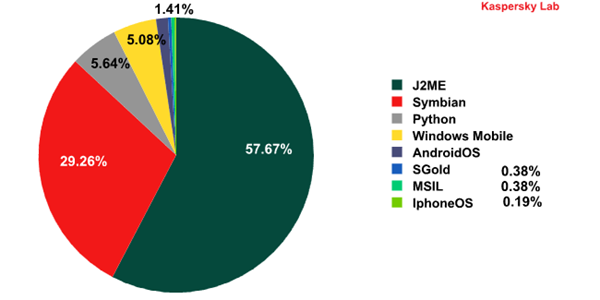
Most mobile threats continue to target the Java 2 Micro Edition (J2ME) platform, which is supported by a huge number of mobile devices. That means it is not only smartphones that are at risk of infection, but basic mobile phones as well. The second most-targeted platform is Symbian, with Python in third place.

maslen mobile2011 pic01 en Mobile Threats Double in Number
The distribution of variants of detected threats, by platform

"The use of SMS Trojans is still the easiest and most effective means by which malicious users can earn money. The reason is relatively simple: any mobile device, be it a smartphone or a basic mobile phone, has a direct connection to its owner's money via their mobile account. It is this 'direct connection' that cybercriminals actively exploit," said the report.

From 2010 onwards, sending fee-based text messages ceased to be the sole illegal money-making scheme for virus writers developing threats targeting different platforms.

Other unlawful schemes such as redirecting mobile Internet banking users to phishing sites and stealing passwords sent by banks to mobile phones were also used. Mobile threats have become more complex than ever and include the emergence of mobile bots and other remotely-controlled software.

Kaspersky Lab predicts an increase in the number of vulnerabilities found on mobile platforms, as well as an increase in the number of threats for Android and the continued use of short numbers by cybercriminals.

Related posts:

Copyright © 2010 ProPakistani.PK

 
Design by Free WordPress Themes | Bloggerized by Lasantha - Premium Blogger Themes | Justin Bieber, Gold Price in India