Friday, March 25, 2011

[Inside AdSense] The do's and dont's to increase cost per click

In previous blog posts we've explained what RPM is and how it's influenced by what users do when they come to your site. We want to take this conversation a step further today, and discuss some strategies that can potentially increase the cost per click (CPC) of your ad units.

Though we can't quantify a good or bad CPC, there are several things you can do (and a few that you shouldn't do) if you're trying to increase the CPC of the ads on your site. Take a look at some of the best practices outlined below:

DOs:
  • Enable all of your ad units to show both text and image/rich media ads. By increasing the number of advertisers competing for your ad units, the ad auction will make sure that the highest paying ad will be shown. Learn more from one of our publishers who made this change, and edit all your units in bulk with the new AdSense interface.
  • Keep your filter list small so you don't lower your revenue potential by blocking the highest-paying ads. Watch this video to better understand the ad auction and how to enable the most competition for your ad space.
  • Increase the number of ads competing for your site by setting up your custom channels for placement targeting. Read this post for more details and instructions on how to set these up.
  • The top-paying ads will be shown in the ad unit that appears first in your HTML code. To take advantage of this, you will need to understand which of your ad units has the highest clickthrough rate (CTR) by using custom channels. Then, you can easily change the code of your website to make sure that your top performing unit is the one with the highest-bidding ads.
DON'Ts:
  • Some publishers believe that by writing about high paying keywords they will be able to improve the earnings on their site. This is not a practice that we encourage. In fact, we always recommend to write about subjects that you know well and that you are passionate about so you can continue to create the compelling, original content that attracts visitors to your site.
  • Don't use scraped content. It's a violation of our policies.
  • Don't create multiple accounts. Publishers are not permitted to maintain multiple AdSense accounts under the same payee name, and having the ad code of different accounts on the same website will not affect your CPC in any way.
  • Finally, don't try to manipulate the standard behavior, targeting, or delivery of ads in any way that is not explicitly permitted by Google. In case you have any doubt, read the AdSense program policies.
We hope this helps you optimize your AdSense implementation and maximize your CPC. Leave us a comment with the results!


--
Posted By Inside AdSense Team to Inside AdSense at 3/25/2011 09:30:00 AM

--
Unable to view the links or images in the message above? Want to comment on this post? Visit http://adsense.blogspot.com/ .
 
You received this message because you are subscribed to the Google Groups "Inside AdSense" group.
To unsubscribe from this group, send email to Inside-AdSense-unsubscribe@googlegroups.com
For more options, visit this group at http://groups.google.com/group/Inside-AdSense

Computer Tips From A Computer Guy

Computer Tips From A Computer Guy


OpenOffice Writer Keyboard Shortcuts

Posted: 25 Mar 2011 04:16 AM PDT

With Microsoft Office Word, the keyboard shortcuts for most menu items are listed beside each menu item. This makes learning keyboard shortcuts much easier. Just because you don't see them in OpenOffice Writer, it doesn't mean they don't exist.

You can still enjoy all the benefits of OpenOffice Writer and still use keyboard shortcuts to make tasks faster. Below we'll look at a list of some of the most useful OpenOffice Writer keyboard shortcuts.

Align Text or Paragraphs

The following list allows you to change how text or paragraphs are justified. You must have the cursor somewhere within the line or paragraph you want to justify for the shortcuts to work.

Ctrl + L = Left Justify

Ctrl + R = Right Justify

Ctrl + E = Center Justify

Ctrl + J = Justify Text

Navigating a Document

The following shortcuts let you move around in your document without using your mouse or arrow keys.

HOME = Start of the current line your cursor is on

END = End of the current line your cursor is on

Ctrl + HOME = The beginning of your document

Ctrl + END = The end of your document

Ctrl + left arrow = Move left by one word

Ctrl + right arrow = Move right by one word

Formatting Text

These shortcuts let you edit paragraph styles, select heading types and format text.

Ctrl + 0 = Default paragraph formatting

Ctrl + 1 = Use Heading 1 style

Ctrl + 2 = Use Heading 2 style

Ctrl + 3 = Use Heading 3 style

Ctrl + B = Bold selected text or word surrounding your cursor

Ctrl + I = Add italics to selected text or word

Ctrl + U = Underline selected text or word

Ctrl + Shift + P = Use superscript for text

Ctrl + Shift + B = Use subscript for text

Ctrl + 5 = Apple 1.5 line spacing

Selecting Text

You do not always have to use your mouse for selecting text. A few handy keyboard shortcuts in OpenOffice Writer let you select text with your keyboard.

Shift + up arrow = Select each line from the beginning line upwards

Shift + down arrow = Select each line from the beginning line downwards

Shift + left arrow = Select each word on a line from the beginning word to each selected left word

Shift + right arrow = Select each word on a line from the beginning word to each selected right word

Shift + Page Up = Select each page from the start page back

Shift + Page Down = Select each page from the start page forward

Moving An Image

Most image editing involves the mouse, sadly. However, you can move an image more precisely when using your keyboard. Make sure the image is selected before continuing.

ALT + arrow keys = Moves the selected image one space at a time up, down, left or right

These are just a few of the many keyboard shortcuts available in OpenOffice Writer. Some of these also apply to other OpenOffice programs. Consider printing this list until you memorize them. You can also add notes about new ones you discover or create.


Copyright © 2007
Online Tech Tips.
Aseem Kishore (digitalfingerprint: a59a56dce36427d83e23b501579944fcakmk1980 (74.125.94.84) )

Post from:

OpenOffice Writer Keyboard Shortcuts


Use Microsoft’s Optimizing Tools to Keep your Windows 7 Computer Running Fast

Posted: 24 Mar 2011 05:25 AM PDT

You see a lot of products out there purporting to help you get back that speed that your computer has lost over time as you've cruised the Internet picking up cookies, installed programs and maybe sometimes unplugged your computer before remembering to shut it off.

Microsoft apparently understands that computers running their operating system need some tweaking and/or maintenance from time to time, so that's why they've included some tools to help users get back some, it not all, of the speed they've lost.

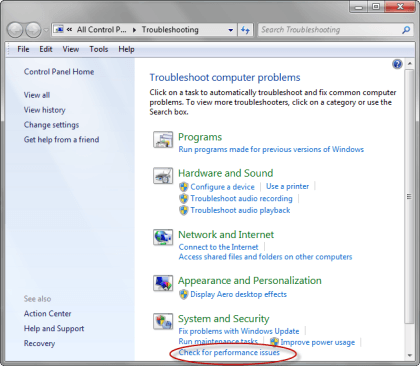
First up, is the Performance troubleshooter, a program that looks at a myriad of computer slowing possibilities and then corrects them, if you give your say so. To run the Performance troubleshooter, click on your Start button, then in the search box, type troubleshooter; press Enter and you should get this:

Troubleshooting - Check for Performance Issues

Click where it says Check for performance issues under System and Security, you should get this screen:

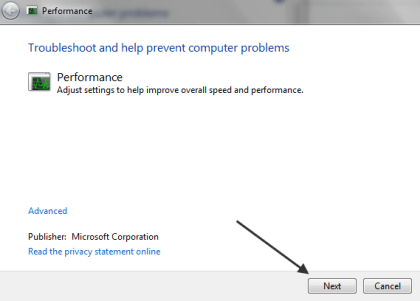
Performance PopUp

Click Next, and the program should start analyzing your computer. The screens that you get next will depend on what Trouble shooter finds, in general it will ask you if it's okay to stop certain programs from launching at startup, etc.

Another thing the performance trouble shooter might recommend is removing programs from your computer that you don't use, because they cause system files to grow larger which Windows has to scan through every time you want to do something; whether they are there because they came with your computer, or because you installed an app that you don't use, or downloaded some useless app that you never bothered to delete.

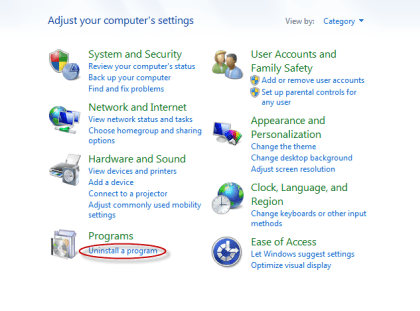
To get rid of old programs, click on the Start button, then choose Control Panel, then click Uninstall a program under Programs:

Control Panel

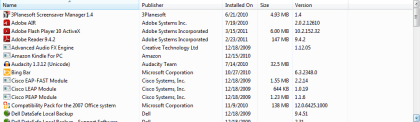
You should get a screen that looks something like this:

Uninstall Program

It should show you every application you have installed on your computer; to get rid of the ones you don't want, highlight them and then click the Uninstall button.

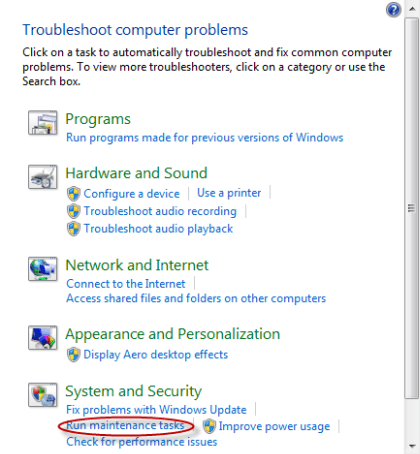
Something else that can slow your computer down are unused files; troubleshooter has an option to help you get rid of those too; from the Trouble shooter menu, click on Run maintenance tasks:

Run Maintenance Tasks on Troubleshooter

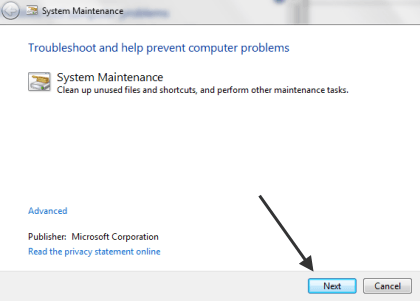
You should get this popup:

System Maintenance PopUp

Click on Next and let Disk Cleanup get rid of temporary files, empty the Recycle bin for you and clean up your system files.

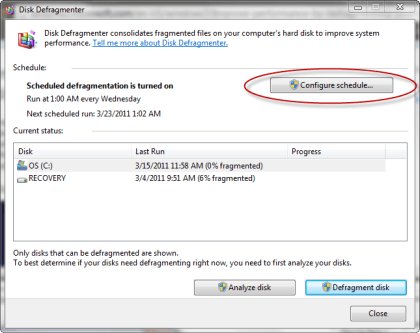
If Trouble shooter notices that your hard drive needs defragmenting, it'll suggest you do so; you can find Disk Defragmenter by clicking on the Start button,and then typing Disk Defragmenter in the Search box. Most computers come with Disk Defragmenter assigned to run automatically every so often; if your computer isn't set that way, you can change it by clicking on the Configure Schedule button on the Disk Defragmenter main screen.

Disk Defragment

And finally, if after running Performance troubleshooter, you don't see much difference in speed, you can always do what Microsoft suggests, and that is run fewer programs at the same time, or better yet, add more memory to your computer.

Because of the way Windows works, computer's tend to run slower the longer you own them; using Microsoft’s optimizing tools can help reduce the problem though, so long as you run them periodically.


Copyright © 2007
Online Tech Tips.
Aseem Kishore (digitalfingerprint: a59a56dce36427d83e23b501579944fcakmk1980 (74.125.94.84) )

Post from:

Use Microsoft’s Optimizing Tools to Keep your Windows 7 Computer Running Fast


Thursday, March 24, 2011

Qubee Offers Referral Discounts: ProPakistani

Qubee Offers Referral Discounts: ProPakistani

Link to Pro Pakistani

Qubee Offers Referral Discounts

Posted: 24 Mar 2011 06:47 AM PDT


Qubee Offers Referral Discounts is a post from: ProPakistani

qubee Qubee Offers Referral DiscountsQubee has launched a reward program, named "Tag a friend, Bag a discount", for its users, announcing a chance to avail 20% discount on their monthly bill for 3 months.

How to Avail Discount?

To avail this discount all a customer has to do is refer a friend to Qubee with his or her given Qubee account number and they will automatically be entitled to the mentioned discount of 20% in their next month's Qubee bill.

Qubee says that the promotion is due to conclude on the 18th of April 2011.

Chief Marketing Officer of Qubee, Mr. Hashim Sheikh said:

"We at Qubee believe in delighting our customers' everyday with not only a service that is centered on his/her daily internet needs but also with promotions & features that add value to your daily Qubee experience.

Moreover, with "Tag a Friend, Bag a Discount", we would like to reward our customers for choosing Qubee as their choice for reliable internet,"

Related posts:

Copyright © 2010 ProPakistani.PK

We Are Pulling Back Letters To Editor Section for a Distressing Reason

Posted: 23 Mar 2011 09:35 PM PDT


We Are Pulling Back Letters To Editor Section for a Distressing Reason is a post from: ProPakistani

In October, last year, we started this section called "Letters to Editor". Then, primarily the aim was to give due coverage to our readers' individual level complaints, queries which we couldn't entertain in our usual transmission.

However, from today, we won't accept any letter based on a very unfortunate incident that happened this week. Following is the complete tale.

If you are following ProPakistani, then you may know that we had a stance against Telenor's "Khamoshi ka Boycott", which is still there. For raising our concerns, we did multiple posts on the said topic, two of which were under "Letters to Editor".

In connection to this ongoing series of posts on "Khamoshi ka Boycott", exactly after one month of our first post on topic, on March 22nd we received an email from a person named 'Nabil Anjum'. We believe this email was sent to multiple bloggers with an article titled "Why Telenor is portraying Pakistan so negative?".

This was actually a lifted article that was already published on ApnaTime.

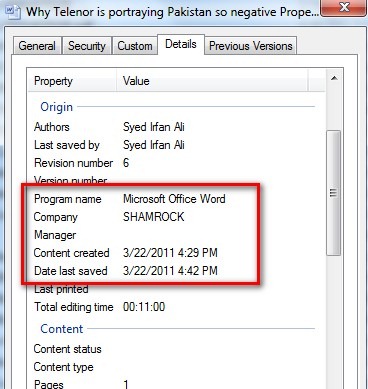
properties thumb We Are Pulling Back Letters To Editor Section for a Distressing ReasonSender requested us to publish this article, however, we ignored it altogether as it was an 'already published content'.

Later in the evening, Jameel Arif published the same article (that was sent to us as well) on his blog with a shocking revelation that document attached in the email was owned by Shamorck, the PR agency of Mobilink.

We have checked our email too, and we can confirm that Jameel Arif's claim of Shamrock's ownership of attached document is valid.

For the purpose, we contacted Shamrock, and asked if they are purposefully spreading this article about Telenor? to which they disowned this email, article and everything. They denied Shamrock's involvement with this incident at any level, and explained that changing the properties of a word file isn't a rocket science.

Mobilink told us that they condemn whatever has happened and company isn't involved in it, directly or in-directly. Mobilink said that they are investigating the issue with their agency.

So who sent us this email then?

Case 1: Shamrock sent this email to various bloggers to get the article published. But as they are denying it – and we don't have enough proofs so its just a theory.

Case 2: Another theory is that competition companies, maybe Ufone, Zong or Warid emailed the bloggers with this article attached. And they changed the properties and the ownership of word file.

Case 3: Telenor sent this article to bloggers (while changing the ownership of document) to get a breakthrough and block the criticism they are receiving for their campaign "Khamoshi ka Boycott".

ProPakistani's Stance on this:

In our opinion, keeping the interest in the mind, there can't be the forth case. We strongly believe that no blogger, reader, PTA, trader, vendor, common person can do this except the up-mentioned 3 cases.

In any of the above mentioned 3 cases, the person / organization responsible for this act is trying to defame competition, which is highly condemnable.

At ProPakistani, we protest against this act, which has hampered PR, Blogging and Telecom community. As an action against it, we are pulling back our Letter to Editor section, which could be used for such illicit work.

Through sources, we have heard that Telenor and Mobilink management is meeting today, or tomorrow at most to discuss the matter. However, neither Telenor nor Mobilink has confirmed us anything on this meeting.

We are confident that we will be able to determine the original sender of this email in coming days. As always, we will keep you posted with whatever information we will get on this.

On a side note, did you notice that Telenor didn't advertise "Khamoshi ka Boycott" during yesterday's Pakistan Vs West Indies quarter finals?

Related posts:

Copyright © 2010 ProPakistani.PK

Google Tips: Improving Your Search Skills

Posted: 23 Mar 2011 09:32 PM PDT


Google Tips: Improving Your Search Skills is a post from: ProPakistani

All of us are accustomed to using Google on daily basis, either directly or indirectly (like the ProPakistani search feature which is powered by Google).

If I ask you what's the number of cancer patients in Pakistan? Almost all of you readers will jump onto Google or any search engine and query for the answer. Google is good at understanding natural questions like ‘what is this’, ‘what is that’ but Google is also able to understand certain other statements which can help you make your search less time consuming & relevant, here are a few.

Get the World Time:

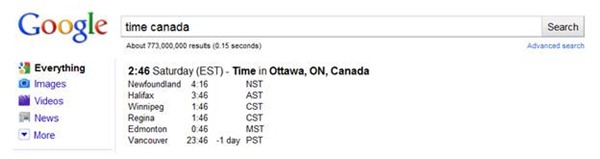
You want to call someone who lives in let's say Canada but you don’t know the time there. Here’s the simplest solution, just Google ‘time Canada’. A screenshot of the result:

clip image0023 Google Tips: Improving Your Search Skills

Currency Convertor

Want the currency exchange rates or the exchange value? Just Google Currency A in Currency B.

clip image0041 Google Tips: Improving Your Search Skills

clip image006 Google Tips: Improving Your Search Skills

Local weather?

No problem.

If your city result doesn’t come up directly, use this term ‘weather channel CityName’ and open the first link of weather.com their reports are quite elaborate and neat.

clip image008 Google Tips: Improving Your Search Skills

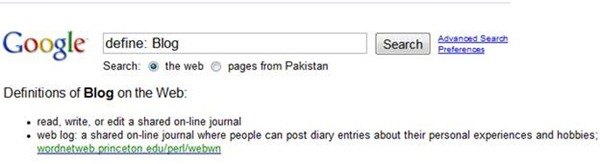
Get Definitions

Want the definition of potpourri but don’t want to read the Wikipedia article or lengthy explanations? Use this keyword, ‘define: DesiredWord’

clip image010 Google Tips: Improving Your Search Skills

A little calculation?

clip image012 Google Tips: Improving Your Search Skills

clip image014 Google Tips: Improving Your Search Skills

clip image016 Google Tips: Improving Your Search Skills

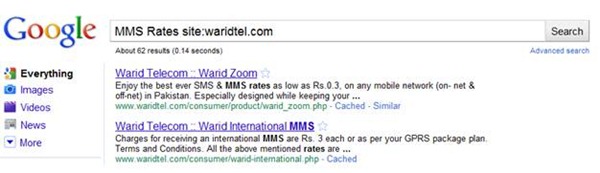
Search From a Particular Website:

So you want to search for MMS Rates on Warid’s website but the search at Waridtel.com didn’t get you your desired results or you are on a website that has no search facility. Here’s how Google can help, write your search term than the keyword site: followed by desired website.

clip image018 Google Tips: Improving Your Search Skills

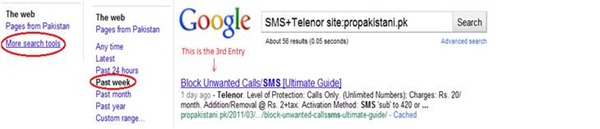
You read an article about blocking SMS on Telenor last week on ProPakistani, want to find it? Use the Search Tools on the left to limit your results to a specific time (last week in our case).

clip image020 Google Tips: Improving Your Search Skills

Related posts:

Copyright © 2010 ProPakistani.PK

How Japan was Ready for the Earthquake?

Posted: 23 Mar 2011 09:30 PM PDT


How Japan was Ready for the Earthquake? is a post from: ProPakistani

Japan Earthquake thumb How Japan was Ready for the Earthquake?The northeast coast of Japan was hit by a magnitude 8.9 earthquake on Friday, the 11th of March. The quake also triggered a 30 foot tsunami that flooded Japan's coastline. Tsunami effects were felt as far the U.S and Hawaii coasts.

The casualty numbers currently stand at 8000 dead and over 12,000 missing. However, as bad as the situation currently is, it could have been much worse if a quake of this magnitude had hit any country other than Japan.

Japan is one of the most prepared countries in the world for a disaster like this. And here's why.

Japan probably has the toughest building sanctions in the world and has spent billions of dollars to make its buildings safer. Concrete is still used in a lot of construction so most of the buildings have deep foundations. Many modern techniques are also employed in order to protect the buildings against an earthquake, for instance, base isolation. It involves mounting the building at the ground level on large rubber blocks or sliding bearings, which allows the building to sway rather than act as a rigid structure which is much more prone to collapse. These act as shock absorbers on a car. Japan also enforces tough rules on building gas and water pipeline.

Other than building sanctions, Japan is also using technology and has employed a $ 1 billion early earthquake warning system which was launched in 2007. And this earthquake proved the money was well spent. The system sent out a warning to millions of people 10 seconds before the earthquake struck. People who were further away, like those in Tokyo got a full 1 minute heads up. The warnings also go out to railway operators who slow down; to crane operators who move heavy machinery and building material away from people; and gas and electricity companies who immediately halt their activities.

Japanese children are told what to do in an earthquake from a very early age. Every year, routine drills are carried out. In the last annual drill, over 670,000 people participated.

The need for these measures and the effort Japan exerts is because Japan accounts for 20% of the worlds most powerful earthquakes.

There is no doubt that a lot of lives were saved due to Japans preparation. Now, other countries prone to earthquakes are moving to mimic the Japanese system for disaster management.

There's a lesson to be learned for us Pakistani's too. Bring in mind the earthquake of 2005, and the chaos that ensued after it. It is clear we were simply not prepared for it. It's required that our government take a look at the Japanese model and try to emulate it so that lives can be saved when the next disaster strikes.

Related posts:

Copyright © 2010 ProPakistani.PK

Jazz Jazba: Free Calls After 2 Minutes

Posted: 23 Mar 2011 09:28 PM PDT


Jazz Jazba: Free Calls After 2 Minutes is a post from: ProPakistani

gupshup Jazz Jazba: Free Calls After 2 MinutesMobilink has introduced "Such Gupshup" under its Jazz Jazba brand which is offering free calls after 2 minutes to any Mobilink number between 11 p.m. to 5 p.m for Rs. 2 + Tax/Day as daily charges.

Offer Details:

The details of the offer are as follows:

  • Mobilink to Mobilink calls are free for an hour after the first two mins
  • Daily Subscription Fee is Rs 2.00+Tax.
  • Offer is valid for JAZZ Jazba customers only.
  • Customers using other packages are required to convert to JAZZ Jazba. SMS to 2233 (Rs 2.5 +Tax)

Call Rates:

  • On-net call charges: Rs 2.8  plus tax/hour
  • FnF call charges : Rs 1.8 plus tax/hour

Detailed Tariff:

  • For first two minutes, On-net calls will be charged at Rs 0.7+Tax per 30 seconds and FnF Calls at Rs 0.45+Tax per 30 seconds.
  • With this offer customer can call 3 On-net FnF number at the lowest hourly call rate of Rs 1.80+Tax/Hr (11 p.m. – 5 p.m.)
  • Off-net calls will be charged as per regular Jazz Jazba tariff
  • Package daily fee of Rs 1+Tax will be applicable in addition to the daily subscription fee

How to Subscribe:

For JAZZ Jazba Subscribers

  • SMS sub to 2233 and dial *105*1# and press send for availing the Such GupShup Offer.

For Non-JAZZ Jazba Subscribers

  • Convert to JAZZ Jazba by dialing 123
  • Press 3 for package settings
  • Press 0 for package selection
  • Press 2 to select Jazba

Upon successful conversion

  • SMS sub to 2233
  • Then dial *105*1# on mobile screen and press send

How to Unsubscribe:

  • Dial *105*4# on mobile screen and press send.
  • Send unsub to 2233

Note:

  • This offer cannot be subscribed while using current JazbaFnF offer. Only one offer can be availed at a time

Related posts:

Copyright © 2010 ProPakistani.PK

 
Design by Free WordPress Themes | Bloggerized by Lasantha - Premium Blogger Themes | Justin Bieber, Gold Price in India