Tuesday, March 29, 2011

Well, Geo is Lot Better Than Indian TV Channels: ProPakistani

Well, Geo is Lot Better Than Indian TV Channels: ProPakistani

Link to Pro Pakistani

Well, Geo is Lot Better Than Indian TV Channels

Posted: 29 Mar 2011 09:49 PM PDT


Well, Geo is Lot Better Than Indian TV Channels is a post from: ProPakistani

In the past, we have heartedly bashed Geo TV, for the reasons we thought were right. But you will have to believe me that Indian Media has turned out to be the best (obviously lot better than Geo) at falsifying the facts and bending them for their own good.

Preparing the nation for today's Semi Final between India and Pakistan, India media has left no stone unturned to belittle Pakistani team, and for this they are bluntly altering the facts to add spice to their shows.

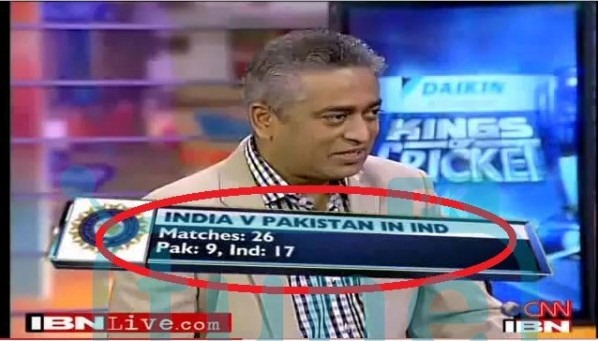
Check following screen shot for example:

indian media thumb Well, Geo is Lot Better Than Indian TV Channels

According this show, Pakistan has played a total of 26 matched in India against India, out of which India won 17 matches and Pakistan managed to win 9 matches. Well, this is not true.

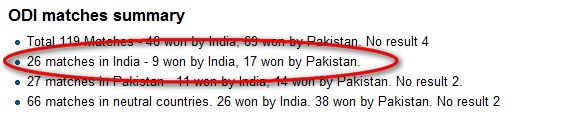
Check think link on WikiPedia: http://en.wikipedia.org/wiki/India_versus_Pakistan_cricket_rivalry

india pakistan cricket Well, Geo is Lot Better Than Indian TV Channels

It says:

ODI matches summary
  • Total 119 Matches: 46 won by India, 69 won by Pakistan. No result 4
  • 26 matches in India: 9 won by India, 17 won by Pakistan.
  • 27 matches in Pakistan: 11 won by India, 14 won by Pakistan. No result 2.
  • 66 matches on neutral grounds: 26 won by India. 38 won by Pakistan. No result 2

This is one example of Jugglery; there are dozens of other incidents where India Media is playing with the facts.

Have a look at following video, and note the commentary, does it make any sense to you? Does this channel deserve its existence on the planet? I doubt it.

Image Credit: Tune.PK

Related posts:

Copyright © 2010 ProPakistani.PK

Weather.Com Predicts a Sunny Day at Mohali

Posted: 29 Mar 2011 09:45 PM PDT


Weather.Com Predicts a Sunny Day at Mohali is a post from: ProPakistani

For those in upper Pakistan, who are thinking that it might rain at Mohali, then the doubts are wrong, according to Weather.com

Weather forecast is smooth and sunny day during today's match. Temperature is likely to remain in high twenties in the day to drop to mid twenties by match end. Humidity level is predicted at 40 percent at 2 PM with as high as 47 percent by 9 PM (local time).

Have a good cricketing day today!

weather thumb Weather.Com Predicts a Sunny Day at Mohali

Related posts:

Copyright © 2010 ProPakistani.PK

Babar Awan Becomes Minister-In charge for IT and Telecom

Posted: 29 Mar 2011 03:22 AM PDT


Babar Awan Becomes Minister-In charge for IT and Telecom is a post from: ProPakistani

babar Awan01 608 1 640x480 Babar Awan Becomes Minister In charge for IT and TelecomIn a latest development today, Dr. Babar Awan was given the minister-ship of Telecom and It Ministry, told us sources in the IT ministry.


Dr. Babar Awan today visited the Ministry to take charge and to get familiar with the heads of Organizations under MoIT and staff, added our sources.

In addition to Minister-In charge of Telecom and IT Ministry, Dr. Awan will retain headship of law Ministry.

Ministry of IT and Telecom was minister-less since February 2011 when Syed Yousaf Raza Gillani, Prime Minister Pakistan had dissolved the federal cabinet.

Earlier, Sardar Assef Ahmed was made Minister for the MoITT in December 2010, however, he had to move out in February 2011 when federal cabinet was dissolved.

Appointment of Dr. Babar Awan is made at a time when ministry has remained back to back minister-less or secretary less for almost three years. His appointment is particularly important as USF is going to begin its operations after a halt of 11 months. Dispute between Chairman PTA and Member Finance of PTA is going to be riddle to solve for Dr. Awan.

Related posts:

Copyright © 2010 ProPakistani.PK

PTCL Signs Business Promotion Pact with ADG LDI

Posted: 29 Mar 2011 01:08 AM PDT


PTCL Signs Business Promotion Pact with ADG LDI is a post from: ProPakistani

ggi1n259 thumb PTCL Signs Business Promotion Pact with ADG LDIPTCL has signed an agreement with ADG LDI (Pvt.) Ltd to promote its Wireless Local Loop services across Pakistan. Mr. Hamid Farooq (SEVP Business Development), PTCL and Mr. Farooq Dar (CEO) ADG LDI (Pvt.) Ltd signed the agreement in a ceremony held at the PTCL headquarters.

ADG LDI (Pvt.) Ltd, a company of the Dollar East Group is a premium provider of telecom services and solutions with expertise in diverse areas and is operating a network of voice and data services with presence in major cities of Pakistan.

PTCL is the largest integrated telecommunication services provider in Pakistan and has been offering voice and data wholesale WLL services to prospective Virtual Network Operators (VNO). These VNOs use the PTCL network infrastructure for end to end service provisioning and use their own retail brand and sales & distribution channels to market these services to their target customer. The resellers can customize their product-line to cater to very distinct segments of the market.

Speaking on the occasion Mr. Hamid Farooq, SEVP Business Development PTCL said,

"Wholesale partnerships like these make a difference to our business. We are pleased to sign this agreement with ADG LDI (Pvt.) Ltd which will strengthen our wholesale product portfolio.

PTCL, being a leader in the industry is committed to offer innovative business opportunities for our growth and success via our partners. We believe ADG will be able to capitalize on this opportunity to its fullest potential and will provide its customers value through dedicated services. "

Mr. Farooq Dar, CEO ADG LDI (Pvt.) Ltd said,

"Keeping in mind the needs & requirements of end users, ADG LDI (Pvt.) Ltd has joined hands with PTCL as a Partner in WLL Operations. I am sure, with the grace of Allah, both companies can jointly make Wireless Local Loop business a success story in terms of penetration & customer retention.

Penetration on the ADG side & retention through Quality of Service provided on the established WLL Network & Infrastructure provided by PTCL. Apart from this project, ADG LDI (Pvt.) Ltd has ambitious plans for consumer telephony market with a number of unique & value added telephony services products to be launched in due course. I hope this venture will add valuable impact on both entities reach & visibility, Insha Allah".

Related posts:

Copyright © 2010 ProPakistani.PK

Zong Launches Pocket TV

Posted: 29 Mar 2011 12:23 AM PDT


Zong Launches Pocket TV is a post from: ProPakistani

Zong TV Zong Launches Pocket TVZong is now offering Live TV Feeds on your Mobile Phone. You can choose from a variety of both local and international channels, all streaming live right to you!

Whether its rocking to the latest music, hooting for your favorite sports team, or just simply keeping up to date on the news and views from around the world, Zong Pocket TV service has it all!

To use the service
  • To use the service log on to the Zong Pocket TV URL http://pockettv.zong.com.pk in your phone’s default browser.
  • The URL will open the Zong Pocket TV page on your phone where the channel list is displayed.
  • Clicking on any of the channel links will open the channel stream in the media player of

Charges:

  • The service is free in the introductory period and expires on the 6th of April.
  • Standard GPRS/EDGE Charges apply.
  • Unlimited GPRS/EDGE package is recommended due to extensive data transfer required
Handset Compatibility and basic requirements for the service
  • Only EDGE supported handsets with a Streaming Media Player (supports H.264 codec + RSTP link) like Real Player will work with Zong Pocket TV service.
  • All Nokia handsets have a Built-in Real player application that plays Streaming links; subscriber has to set his/her edge settings of streaming player up to 84.42 kbps for using the Zong Pocket TV service.
  • Streaming player in Java OS phones such as Sony Ericsson, Motorola, Samsung, and LG will work with Zong Pocket TV service.
  • Windows OS phones such as Imate and HTC will also be able to use the service.
  • Android OS phones will also be able to use this service.
  • Old handsets that have streaming players that lack H.264 codec support will not be able to work with Zong Pocket TV service.
  • Apple OS phones/tablets will not work with Zong Pocket TV service.

Related posts:

Copyright © 2010 ProPakistani.PK

Ufone Bags ICAP Best Project Award

Posted: 29 Mar 2011 12:15 AM PDT


Ufone Bags ICAP Best Project Award is a post from: ProPakistani

U Logo thumb1 Ufone Bags ICAP Best Project AwardThe Professional Accountants in Business (PAIB) Committee-ICAP has conferred Best Corporate Sector Project Award to Ufone's "Telecom Passive Infrastructure Sharing" project. Award was given at a ceremony held at Marriott Hotel, Karachi.

As part of the Telecom Infrastructure Sharing project, Ufone team has achieved highest tower sharing ratio in telecom industry through various types of arrangements with other operators, said a statement issued by the company. The Telecom Infrastructure Sharing project has resulted in manifold increase in Ufone's profitability, the company said.

It is pertinent to mention here that the ICAP was conducting the 'First Professional Excellence Awards' of the Institute as part of its Golden Jubilee celebrations in order to honor the outstanding contributions of its members.

The Professional Excellence Awards are the first of its kind, to acknowledge the achievements of Chartered Accountants who have added value to their organizations/business, by innovative contributions to business processes, finance, accounting and internal control or leading change management.

To maintain the transparency of the process, the board of PAIB Committee constituted a three member Jury to evaluate projects that meet the qualification criteria while the winners of the event will be awarded an economy airline fare for attending any of the renowned finance related international conferences and events.

Related posts:

Copyright © 2010 ProPakistani.PK

Computer Tips From A Computer Guy

Computer Tips From A Computer Guy


Use Windows 7 Advanced Clock Features

Posted: 29 Mar 2011 04:04 AM PDT

Sometimes it seems that Microsoft assigns a team of software engineers to take a look at every single aspect of their Windows operating team between versions, and then tells them to make suggestions as to what might make their part cooler; how else to explain the update to the simple clock in Windows 7?

In its normal default status, the clock is pretty simple, it's just what we've all come to expect with the clock on our computer; in Windows 7, it looks like this:

Normal Clock

Then, when you click on it, you get this:

Expanded Normal Clock

But clicking on Change date and time settings… brings up this popup menu:

Change Date and Time PopUp

Under the Date and Time tab, are buttons for allowing you to change your date and time, as well as your time zone; nothing new here.

Under the Additional Clocks tab however, there is something new:

Additiona Clock Tab

Here you can add two additional clocks to your computer. To do so, click the check box, then click on the down arrow to bring up a list of possible places you'd like to keep track of the time for:

Pacificfic Time Clock

Then, type in a name for your clock, and then add another clock as well if you like:

Two Clocks Created

Once you're satisfied, click on the Apply button, then Ok to return to your regular screen.

To see how your clocks work, hover over the time:

Display Three Times

Then, click on the time:

Three Clock Display

If you have family living overseas, for example, this is a great option to help you keep track of when is a good time to call them.

There's one more feature you can use with Windows 7 Clock, and that is under the third tab, Internet time:

Internet Time Tab

This option allows you to have your computer clock set automatically by choosing one of the government time sites. Choosing this option is a good idea because despite what you may think, computer clocks are not all that accurate; they tend to go out of time far faster than most would suppose; to get around that problem, have your computer check the real time and update your computer automatically.

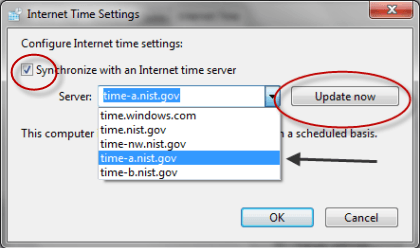
To use this option, click on Change settings… you should get this popup:

Change Internet Time Settings

Click the check box that says Synchronize with an Internet time server; then click the down arrow to choose a site. Then click the Update now button, and then Ok. From here on in your computer will have its clock updated automatically once a week from the site you've designated

By giving Windows Clock a little update, Microsoft has made this one tiny aspect of your computer, just a little more useful.


Copyright © 2007
Online Tech Tips.
Aseem Kishore (digitalfingerprint: a59a56dce36427d83e23b501579944fcakmk1980 (74.125.94.82) )

Post from:

Use Windows 7 Advanced Clock Features


How to Convert MIDI Files to MP3 Files

Posted: 28 Mar 2011 05:11 AM PDT

It’s easy to listen to MIDI files on your computer, since most media players can play them. However, since MIDI files are sets of musical instructions rather than sound files, your portable devices probably won’t be able to play them back. Fortunately, it’s a simple process to convert your MIDI music files to MP3 sound files. These methods will help you convert your files quickly and easily.

Convert MIDI to MP3 with a Sound Recorder

The preferred method to convert MIDI files to MP3 files is to record them in real time. You can play them in any media player, then simultaneously record them using a sound recording software program. Winamp is one of the best free media players to use, since it has its own equalizer with several presets.

Free Sound Recorder is a good sound recorder to use to record the music in MP3 format, since it lets you control the input volume and balance. It even lets you edit your finished MP3 sound files after conversion.

To get started, download and install Free Sound Recorder. Also download and install Winamp. Start Winamp and let the software program search your library for music files. You can re-scan your music library at any time in Winamp by selecting File and Add Media to Library. Navigate in the Media Library to find and select the MIDI file you’d like to convert.

Add Music to Winamp Library

Select Options, Preferences and Input. Select Nullsoft MIDI Player and click Configure. In the Device tab, select DirectMusic/Microsoft Synthesizer (with output), then click OK. This will allow the equalizer to work with the playback of MIDI files.

Winamp Midi Player Options

Click View and Equalizer. Change the equalizer settings manually by moving the sliders. You can also load an equalizer preset by clicking Options, Equalizer, Load Preset and Preset. Select the equalizer preset the best matches the type of MIDI file you’re converting to MP3.

Load Winamp Equalizer Preset

Open Free Sound Recorder. Click the Mixer button, which looks like a small speaker. Beside Recording Device, select your sound card. Make sure you don’t select your microphone, since this will distort the sound quality. Move the sliders below to change the volume and balance of your recording if desired. If the Recording format displayed is not MP3, click Options, click the General Settings tab, then select MP3 file as the Output File Type.

Free Sound Recorder

In Winamp, press the Play button. Let the song play all the way through.

Winamp Play Button

Watch the Status screen in Free Sound Recorder and listen to make sure that the volume level is right. Adjust the volume and balance of the input in Free Sound Recorder as necessary.

Also adjust the output volume in Winamp. When you’re satisfied with the input and output settings, stop the playback in Winamp.  In Free Sound Recorder, press the Record button, which has a circle at the center. Then press the Play button in Winamp again and wait for the song to finish. Press the Stop button in Free Sound Recorder to complete the conversion.

Recording in Free Sound Recorder

Fast and Batch Conversion of MIDI Files to MP3 Format

If speed and ease is more important than control over the quality of your sound file, you can use Free MIDI to MP3 Converter to convert your files. This is a very simple software program to use. Just press the Add button to browse the music your hard drive.

Add MIDI Files to Convert to MP3

Select the MIDI files you’d like to convert to MP3. To select multiple files, click one file then press the shift key while you click the last file. Alternatively, you can press the control key while you click to select non-contiguous MIDI files to convert. Click Open to add the files.

Select MIDI Files

When you’ve finished adding files, select the Output folder. You can either output the MP3 files to the same folder as the source MIDI files, or you can select a different folder by clicking Other.

If you select Other, then click the button with the ellipsis to browse your hard drive for the desired output folder. Either select an existing folder or create a new folder and give it a name you can remember. When you’re finished, click Convert to MP3. The software will quickly convert the MIDI files and automatically save them as MP3 files in your chosen folder.

Convert MIDI Files

While this method is far faster than recording the MIDI file in real time, the chances are good that it will dramatically reduce the sound quality of your MP3 sound files. For the best possible sound quality, use the sound recording method in the first section of this article.

To add even more songs to your library, read Convert YouTube videos to MP3, MP4, WAV.


Copyright © 2007
Online Tech Tips.
Aseem Kishore (digitalfingerprint: a59a56dce36427d83e23b501579944fcakmk1980 (74.125.94.82) )

Post from:

How to Convert MIDI Files to MP3 Files


How to Tile a Bathroom

eHow of the Day

Tile is a popular floor and wall covering in bathrooms where surfaces need to resist water and moisture. A little more expensive than linoleum for floors or fiberglass for shower walls, tile increases the value of a home and adds a quality look. Installing tile in your bathroom is a project you can complete on your own, with the right tools and preparation.…keep reading

More Like This
New on eHow
ADVERTISEMENT
You Should Follow Us

 
Design by Free WordPress Themes | Bloggerized by Lasantha - Premium Blogger Themes | Justin Bieber, Gold Price in India