| eHow of the Day The adage "build it and they will come" is helped along greatly by some hard-hitting marketing. You can make an effective brochure that has people drooling to get to your resort if you follow a few simple steps. Don't scrimp on saving money with poor-quality paper or crummy photos--that will just get the idea across that your accommodations are equally as chintzy. Splurge on your brochure's printing and quality and folks are more likely to splurge on paying you a visit.…keep reading More Like This New on eHow | You Should Follow Us |
Monday, March 28, 2011
How to Make an Effective Brochure
Sunday, March 27, 2011
Warid Celebrated Earth Hour 2011: ProPakistani
Warid Celebrated Earth Hour 2011: ProPakistani | |
| Warid Celebrated Earth Hour 2011 Posted: 27 Mar 2011 09:30 PM PDT Warid Celebrated Earth Hour 2011 is a post from: ProPakistani Warid celebrated the Earth Hour, along with the whole world, on March 26th, 2011. According to a statement by company, these celebrations were part of Warid's going green drive. Earth Hour is the world's largest global climate change initiative. It's a global commitment led by the (WWF) World Wide Fund for Nature for energy conservation, climate change and global warming. In the past, Warid has taken multiple steps to play its role for environment friendly greener planet. Recently, Warid commenced a project of implementing Virtual Desktop Infrastructure (VDI) solution based on Microsoft Windows Server 2008 R-2 Hyper-V. With this implementation, Warid has not only controlled the total carbon emissions by 581730 pounds, but has also managed to reduce power consumption by 180 percent annually. Warid was also the first cellular company to introduce/deploy solar powered BTS in the country. These cell site towers are 100 % powered by solar energy, hence reducing the carbon dioxide emissions and noise pollution, both of which are unfriendly to environment. With these solar powered cell sites, Warid has extended its network reach to the rural areas of the country where there is no commercial power or they are with frequent power outages. Related posts:
|
| You are subscribed to email updates from Pro Pakistani To stop receiving these emails, you may unsubscribe now. | Email delivery powered by Google |
| Google Inc., 20 West Kinzie, Chicago IL USA 60610 | |
Computer Tips From A Computer Guy
Computer Tips From A Computer Guy |
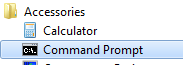
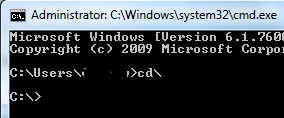
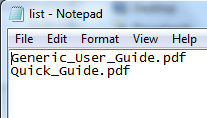
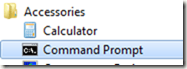
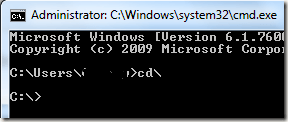
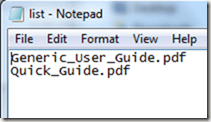
| Copy File Names from Windows Explorer to a Text List Posted: 27 Mar 2011 04:53 AM PDT If you have a list of file names in a directory you want to copy to a spreadsheet or text document, normally you would copy and paste each name individually. However, you can easily copy all file names to a text document for free using the command prompt in Windows. No need to download other software. Every Windows operating system lets you have access to the command prompt to run various commands. Why use other software, when you already have a useful directory printing tool installed? Open Command PromptGo to Start and select All Programs. Choose Accessories and select Command Prompt. In Windows XP and earlier, you can also go to Start, select Run and type cmd.exe. Press Enter to open the command prompt. If you have Windows Vista or higher, you may not be able to run the command prompt under your user name. If you have any problems with the remaining steps or opening the command prompt, close the command prompt (if open), right click Command Prompt within the Accessories menu and choose Run as administrator. This will let you correctly run command prompt commands. Type cd\ at the first prompt. This lets you change the directory. Next, type the following, but use the directory you want to print the file list for: dir c:\directory path /b >list. Just a few things to keep in mind. Directory Path must be replaced with the full path name. For instance, to access something in your My Documents folder, you would use the following path: c:\users\username\my documents. Your list is saved under the main C:\ directory. You can open it by going to My Computer and double-clicking the C:\ drive. It should be listed near the end of the file list. The final file should look similar to the following: The file opens in Notepad, which is a universal program for text editing which is pre-installed on all Windows systems. The creates a compatible list that almost every system can open. You can then copy the list to any other program. For instance, if you need the file list in Excel, press Ctrl plus A to select all file names. Press Ctrl plus C to copy the text. Open Excel and press Ctrl plus V to copy each name in a separate cell. If you just want to print a list of all files and folders in a certain directory, you can use free software to create an HTML table or print the listing to a text file.


Related postsCopyright © 2007 Online Tech Tips. Aseem Kishore (digitalfingerprint: a59a56dce36427d83e23b501579944fcakmk1980 (209.85.224.88) ) Post from: |
| You are subscribed to email updates from Online Tech Tips To stop receiving these emails, you may unsubscribe now. | Email delivery powered by Google |
| Google Inc., 20 West Kinzie, Chicago IL USA 60610 | |


5:05 AM