Monday, January 3, 2011

Free Call After 5 Min: PTCL New Year Bonanza: ProPakistani

Free Call After 5 Min: PTCL New Year Bonanza: ProPakistani

Link to Pro Pakistani

Free Call After 5 Min: PTCL New Year Bonanza

Posted: 03 Jan 2011 03:11 AM PST


Free Call After 5 Min: PTCL New Year Bonanza is a post from: ProPakistani

new y1293823657 thumb Free Call After 5 Min: PTCL New Year BonanzaPakistan Telecommunication Company LTD (PTCL) has launched country wide "PTCL New Year Bonanza" which has especially been designed to encourage the existing and potential PSTN and Vfone subscribers.

This limited time offer is applicable to all PTCL and Vfone customers from 1st Jan onwards. With this New Year bonanza the PTCL customers can call from PTCL landline or vfone to Ufone, PTCL landline (local and NWD) and to Vfone (local and NWD) between 8pm to 8 am which will be charged for only first five minutes and the remaining duration of the call will be free.

Details:

  • First 5 minutes: Will be charged as normal tariff
  • After 5 minutes: No charging
  • This promotion will be applicable for all calls made from PSTN and Vfone on PSTN Network, Vfone Network and Ufone Network (033X Numbers only)
  • Promotion will be applicable daily from 8 pm to 8 am
  • Launch Date: 1st January, 2011
  • End Date: 31st January, 2011

Naveed Saeed SEVP Commercial Said that PTCL always provides best packages and promotions to its customers and this particular promotion will enable customers to make longer duration calls to their loved ones without worrying about the bill. He further added that PTCL has always and will always strive to provide our customers with the best and most affordable services.

Aasif Inam EVP Consumer Services said these new packages will reinforce PTCL's image as a customer oriented organization and it will be our top priority to facilitate our customers to the maximum. Keeping in mind the needs of our customers, in future PTCL will introduce more such offers to facilitate our users.

Syed Asim Ali EVP Commercial Planning (Vfone) said that these new calling incentive has been introduced to encourage the Vfone usage among customers and to keep them connected to their loved ones and by introducing these new calling packages PTCL intends to address the needs of our valued and budget conscious customers in the most effective and affordable way possible.

Related posts:

Copyright © 2010 ProPakistani.PK

InfoLinks Ads Spotted on a Government Website

Posted: 03 Jan 2011 12:14 AM PST


InfoLinks Ads Spotted on a Government Website is a post from: ProPakistani

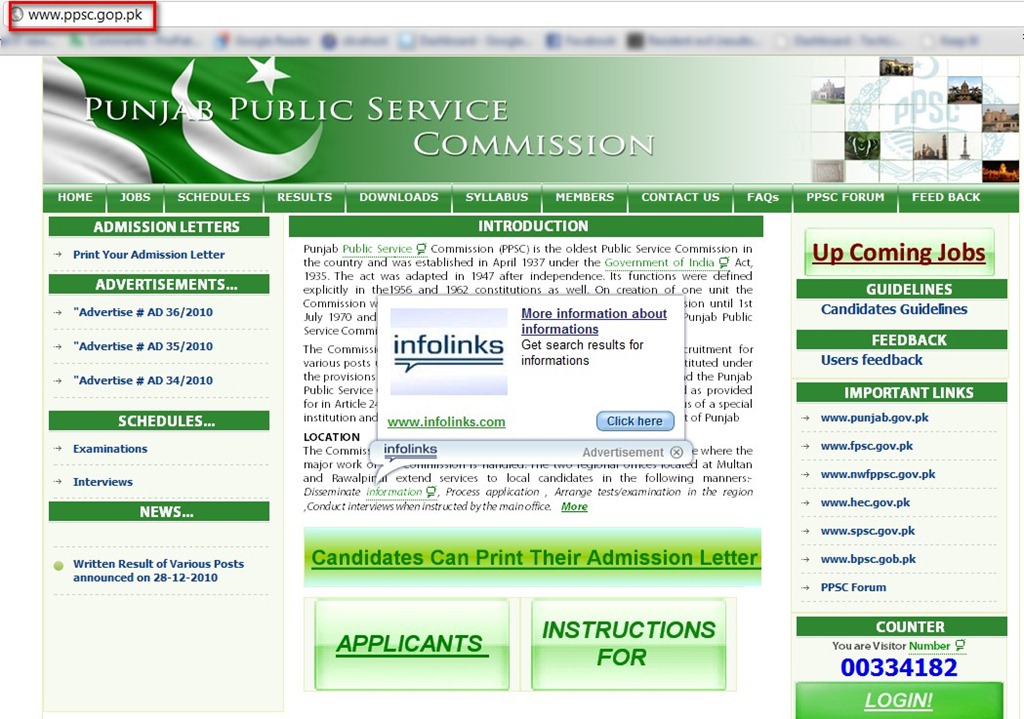
Punjab Public Service Commission is using Infolinks.com ads for earning money!

We can't say that this is a deliberate attempt from Punjab Public Service Commission to earn money out of its web portal, instead it is assumed that only webmaster is illegally earning money through this. Again we are not sure, maybe the whole department is involved in the corruptions.

Pakistan Infolinks thumb InfoLinks Ads Spotted on a Government Website

We have written in past on how badly the government websites are managed, just because the top executives have very little or no knowledge about the internet and websites.

This is common now with government's official website that their webmasters are earning from banner and link ads.

Thanks to Umer Fawad of PakExpert Technologies for tipping us on this

Related posts:

Copyright © 2010 ProPakistani.PK

Mobilink Launched Samsung Galaxy Tab at Lahore Bloggers Meet-up!

Posted: 02 Jan 2011 11:18 PM PST


Mobilink Launched Samsung Galaxy Tab at Lahore Bloggers Meet-up! is a post from: ProPakistani

In the year 2010, Mobilink initiated a new tradition of involving online community of bloggers in mobile technology related launches in Pakistan. Company says that the aim was to engage, seek opinion and build relationship with the people who are always abreast with the latest technological trends in the telecom and mobile phone technology.

On New Year's eve, Mobilink in collaboration with Samsung launched the P1000 Galaxy tablet in the blogging community of Lahore.

The meet-up took place in Bistro 201 and about 120 bloggers from Karachi, Lahore and Islamabad showed up at the event including Jehan Ara, President PASHA Pakistan, Jibran, the current top Google mapper from Pakistan and teams of ProPakistani and ApnaTime.

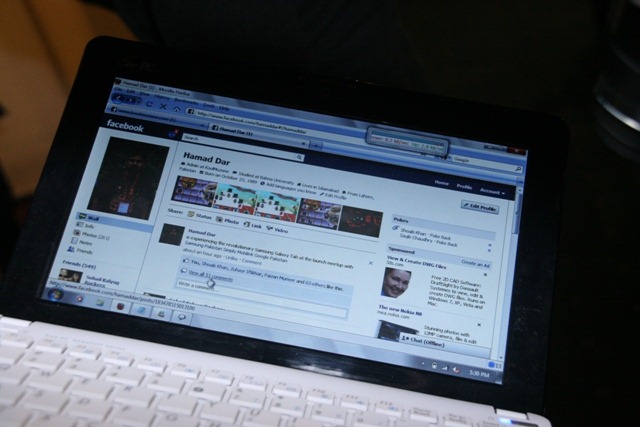
The event began at around 4pm and continued till 6pm. Many prizes were also given away including one Galaxy tablet to winner of an online competition, Hammed Dar of KoolMuzone from Islamabad. Two mobile phones and many Mobilink, Samsung goody bags were distributed among bloggers by asking pop questions.

Overall, the bloggers meet-up brought a good end to 2010. Last year, Mobilink arranged 3 blogger meet-ups, one in Lahore for the Launch of Motorola Milestone – the android phone in the local market. The second one was arranged in Islamabad to mark the launch of HTC HD7 Windows Mobile Phone 7 powered smartphone. The last blogger meet-up was held on December 31st to celebrate the launch of Samsung Galaxy Tab.

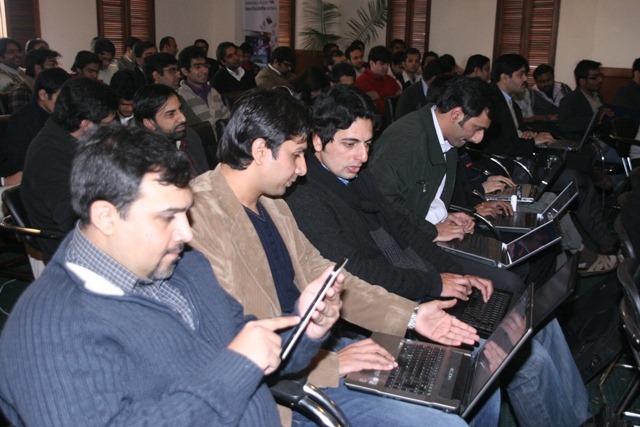
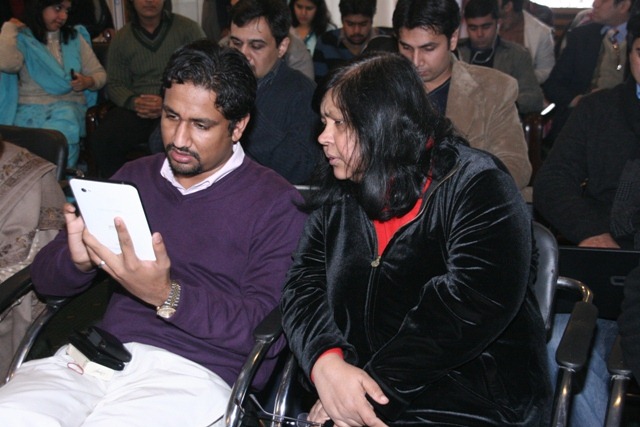
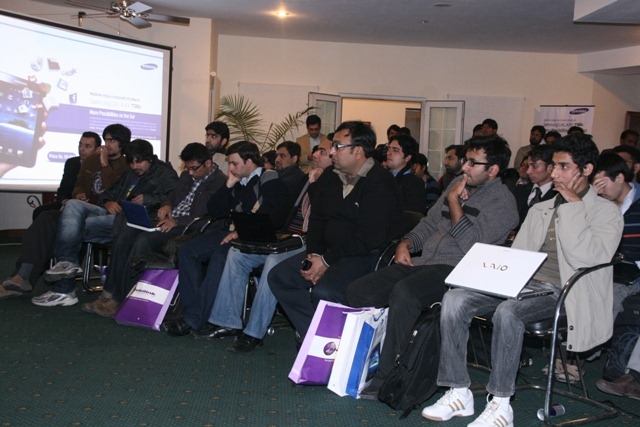
Here are some photos from the event.

Mobilink Samsung Blogger Meetup thumb Mobilink Launched Samsung Galaxy Tab at Lahore Bloggers Meet up!Mobilink Samsung Blogger Meetup 1 thumb Mobilink Launched Samsung Galaxy Tab at Lahore Bloggers Meet up!Mobilink Samsung Blogger Meetup 3 thumb Mobilink Launched Samsung Galaxy Tab at Lahore Bloggers Meet up!Mobilink Samsung Blogger Meetup 4 thumb Mobilink Launched Samsung Galaxy Tab at Lahore Bloggers Meet up!Mobilink Samsung Blogger Meetup 5 thumb Mobilink Launched Samsung Galaxy Tab at Lahore Bloggers Meet up!Mobilink Samsung Blogger Meetup 6 thumb Mobilink Launched Samsung Galaxy Tab at Lahore Bloggers Meet up!Mobilink Samsung Blogger Meetup 7 thumb Mobilink Launched Samsung Galaxy Tab at Lahore Bloggers Meet up!Mobilink Samsung Blogger Meetup 8 thumb Mobilink Launched Samsung Galaxy Tab at Lahore Bloggers Meet up!Mobilink Samsung Blogger Meetup 9 thumb Mobilink Launched Samsung Galaxy Tab at Lahore Bloggers Meet up!Mobilink Samsung Blogger Meetup 10 thumb Mobilink Launched Samsung Galaxy Tab at Lahore Bloggers Meet up!Mobilink Samsung Blogger Meetup 11 thumb Mobilink Launched Samsung Galaxy Tab at Lahore Bloggers Meet up!Mobilink Samsung Blogger Meetup 13 thumb Mobilink Launched Samsung Galaxy Tab at Lahore Bloggers Meet up!Mobilink Samsung Blogger Meetup 14 thumb Mobilink Launched Samsung Galaxy Tab at Lahore Bloggers Meet up!Mobilink Samsung Blogger Meetup 15 thumb Mobilink Launched Samsung Galaxy Tab at Lahore Bloggers Meet up!Mobilink Samsung Blogger Meetup 16 thumb Mobilink Launched Samsung Galaxy Tab at Lahore Bloggers Meet up!Mobilink Samsung Blogger Meetup 17 thumb Mobilink Launched Samsung Galaxy Tab at Lahore Bloggers Meet up!Mobilink Samsung Blogger Meetup 18 thumb Mobilink Launched Samsung Galaxy Tab at Lahore Bloggers Meet up!Mobilink Samsung Blogger Meetup 19 thumb Mobilink Launched Samsung Galaxy Tab at Lahore Bloggers Meet up!Mobilink Samsung Blogger Meetup 20 thumb Mobilink Launched Samsung Galaxy Tab at Lahore Bloggers Meet up!Mobilink Samsung Blogger Meetup 21 thumb Mobilink Launched Samsung Galaxy Tab at Lahore Bloggers Meet up!Mobilink Samsung Blogger Meetup 22 thumb Mobilink Launched Samsung Galaxy Tab at Lahore Bloggers Meet up!Mobilink Samsung Blogger Meetup 23 thumb Mobilink Launched Samsung Galaxy Tab at Lahore Bloggers Meet up!

Related posts:

Copyright © 2010 ProPakistani.PK

Ufone Solid Offer Coming Your Way Again!

Posted: 02 Jan 2011 11:05 PM PST


Ufone Solid Offer Coming Your Way Again! is a post from: ProPakistani

Ufone has decided to re-introduce its famous most "Ufone Solid Offer" again, told us sources close to company.

Ufone Solid Offer allows all Ufone to Ufone calls to go free after first three minutes. Call tariff for first 3 minutes will charged according to your current call package. Meaning that, you don't need to change your plan, just subscribe to solid offer to make free calls after first three minutes.

Package Details:

This time, Solid Offer will allow free calls after first three minutes, round the clock except 6 PM to 9 PM.

It merits mentioning here that Ufone had to restrict activations for solid offer when it went extra-popular and started itching the network capacity.

Activation:

Activation is done by dialing *38#

Charges:

Charges for one month are Rs. 20 plus tax

Offer is going to be valid from January 4th to Feb 3rd, 2011.

Related posts:

Copyright © 2010 ProPakistani.PK

Djuice Now Offers 15 FnF Numbers

Posted: 02 Jan 2011 10:27 PM PST


Djuice Now Offers 15 FnF Numbers is a post from: ProPakistani

15 FF thumb Djuice Now Offers 15 FnF NumbersDjuice has increased the maximum numbers of FnF limit. Now Djuice customers can add 15 numbers in their FnF list.

With this offer Djuice customers will now be able to fully customize their FNF portfolio according to their needs,  and use up to 15 FnF numbers whether off net, on net or international  – fully customizable.

Call rates to FnF numbers will be based on your package plans, for instance:

  • Call rate for on-net FnF will be 50 paisas/30 seconds
  • Call rate for Djuice Simple on on-net FnF is Rs. 4 per hour from 11 PM to 8 AM
  • Djuice Jagtay Raho subscribers can make free calls to on-net FnF from 1 AM to 6 AM (5 Paisas per call)
  • With Boltay Jao offer, call for on-net FnF numbers are charged at Rs. 1.5 plus tax per hour – round the clock.
  • Off-net calls are charged at Rs. 1 plus tax per 30 seconds

How to activate:

  • Activation Mechanism: Dial 555 and press 4 to add your Friends and family numbers

For more details call helpline

Related posts:

Copyright © 2010 ProPakistani.PK

How to Keep Skin Moisturized in Cold Weather

eHow.com - How To Do Just About Everything
eHow Of The Day

How to Keep Skin Moisturized in Cold Weather

by Contributing Writer

Blasting heaters and freezing weather can really zap the moisture from your skin. To keep skin balanced and healthy, you’ll need to stick to a skin care regimen that focuses on gentle cleansing and deep moisturizing, especially during cold weather. Cleansing, exfoliating and moisturizing are the three keys to glowing skin when temperatures drop. Read on to learn how to keep skin moisturized and avoid products and routines that contribute to dry skin.…Keep reading


Advertisement

Featured Member Articles
You Should Follow Us!

Computer Tips From A Computer Guy

Computer Tips From A Computer Guy


Change Application Icons in Mac OS X

Posted: 03 Jan 2011 03:51 AM PST

Before I bought a Mac laptop a year ago, I was always a hardcore PC user. One of the things I like about Windows is that you can customize everything pretty easily. Whether it be the desktop, folders, applications, you can pretty much customize anything. Even though I love using OS X, it is a little annoying to figure out how to customize aspects of the operating system.

One fine example of this is trying to change the application icons for programs in OS X. In Windows, you can right-click on an application icon and click the Change Icon button! Pretty simple! In OS X, changing the icons for programs is pretty unintuitive.

In this post, I am going to walk you through the steps to change your Mac icons in OS X. Note that you can change the icons for applications, folders, files and even disk drives.

Basically, how it works in OS X is that you can change the icon for a program, folder, or file by copying a different icon and then pasting it over the current icon that you don’t want anymore. Overall, it’s fairly simple, it’s just not something you would ever think of on your own!

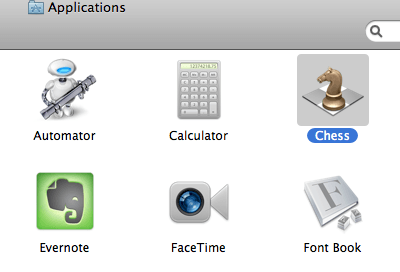
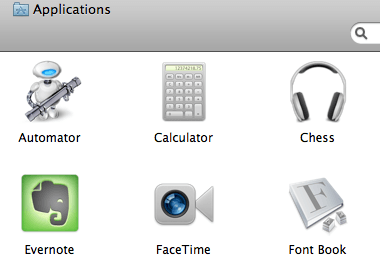
So let’s say I want to randomly replace the Chess application icon with something I downloaded from the Internet, in my case a pair of headphones!

change icons mac

change os x icons

Obviously, this is just random, but it is to illustrate the procedure. So in order to replace the default chess icon with these headphones, we need to open Finder and go to the Applications folder where Chess is located. Then select it.

mac icons change

Now press Cmd + I or click on File and choose Get Info or simply right-click on the icon and choose Get Info.

mac icons

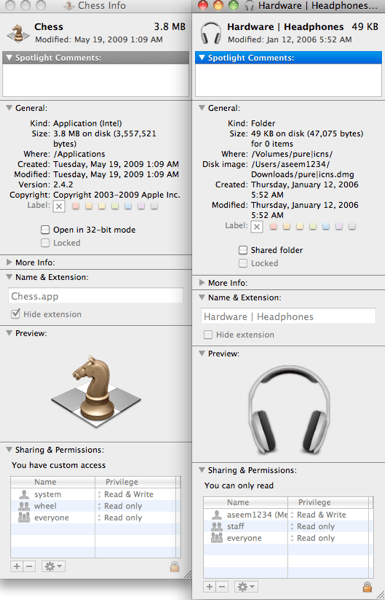
Once the Get Info window is open, do the same thing for the headphones icon. Now you should have both of the information screens open side by side. Note that you do not have to keep them both open if you don’t want to.

os x icons

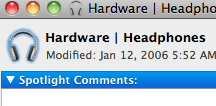
Now here’s where the fun begins! In order to replace the Chess icon, you have to click on the small version of the headphone icon at the very top left of the Get Info screen. Select it and then press Cmd + C.

mac icons

You should see that it is highlighted in blue when selected. Now go to the Get Info window for the Chess program and click on it’s icon at the top left. Now press Cmd + V to paste! What happened?!?! Expecting the icon to be replaced, but nothing happened?

Yes, it’s a bit of a trick in OS X! There are some icons in OS X that you simply cannot just overwrite whenever you want! Those include all the applications that came installed on your Mac plus other programs like iTunes, iChat, iMovie, etc, etc.

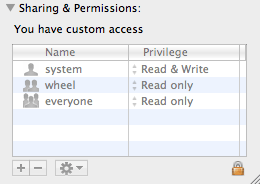
Before you can do the copy/paste trick, you have to unlock the icon you want to replace. In order to do this, you have to click the small lock icon at the bottom of the Get Info window:

replace icons mac

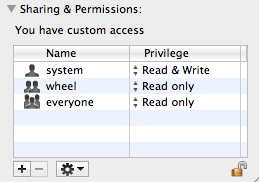
When you click on the lock icon, you’ll be asked to enter the Administrator password for the computer. Go ahead and type it in and then the icon will be unlocked and the Sharing and Permissions section will not be greyed out.

unlock icons

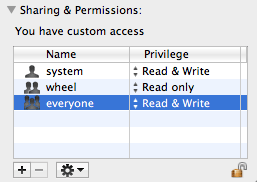
But you’re not done yet! Now you have to click on the drop down next to Everyone in the Sharing & Permission section and change it from Read Only to Read & Write.

read and write

Now after all of this, you can perform the copy and paste of the icons and it will finally replace it! Copy the icon from the top left and select the top left Chess icon and paste. Whew! What a procedure!

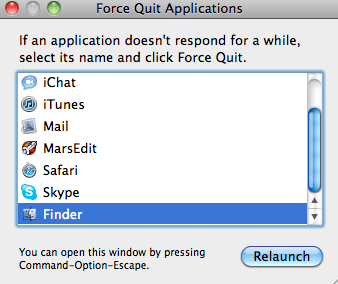
Also, note that if the icon is not changing to the new icon in Finder, you can press Cmd + Option + Esc and choose Finder and then click Relaunch. Then you should see the new icons displayed properly in Finder.

relaunch finder

And now that I replaced my Chess program icon with a useless headphones icon, what do I do if I want to restore it back to the original system icon?

icons in os x

Well it’s pretty easy! Click on the program and then open the Get Info screen again. Again unlock the Get Info screen and give Everyone Read and Write permissions if it is not already set to that. Now select the icon and press Delete! Instantly, you’ll see the default system icon stored on your Mac appear! That is pretty much everything I know how changing icons in OS X on your Mac! Enjoy!

If you want more Mac tips and tricks, check out my other blog Switching To Mac. It’s full of great OS X tips updated daily!


Copyright © 2007
Online Tech Tips.
Aseem Kishore (digitalfingerprint: a59a56dce36427d83e23b501579944fcakmk1980 (74.125.94.83) )

Post from:

Change Application Icons in Mac OS X


Design by Free WordPress Themes | Bloggerized by Lasantha - Premium Blogger Themes | Justin Bieber, Gold Price in India