


 6:45 AM

|
Tuesday, December 21, 2010
[Owen Abroad] Visibility is not the same as transparency

Computer Tips From A Computer Guy
Computer Tips From A Computer Guy |

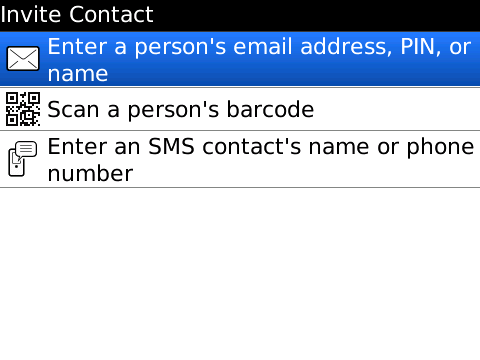
| Posted: 21 Dec 2010 04:25 AM PST Blackberry Messenger is a secure instant messaging application that is unique to Blackberry devices. It uses the Blackberry PIN, which is unique to each Blackberry, to send messages from device to device. You can add contacts to Blackberry Messenger by adding their PIN, scanning their barcode, or sending them an email or SMS invitation. It is in your best interests to only add people you know and trust to Blackberry Messenger, because once someone gets your PIN, the only way to make sure that person cannot continue to message you is to get a new device with a new PIN.
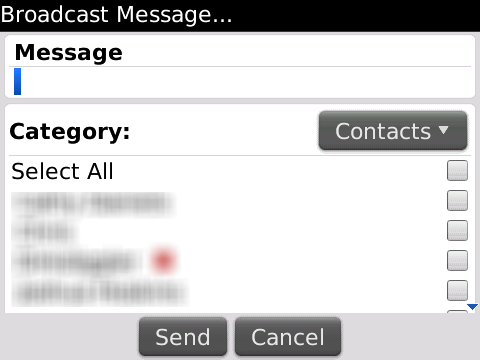
Blackberry Messenger, unlike other instant messaging applications, allows you to Broadcast Messages. You can send one message to multiple people by choosing them from a checklist. In the event of an emergency, this feature can save you time by allowing you to send the same information to everyone who needs it. It also allows you to send messages of unlimited length, unlike some other instant messenger protocols or SMS. You don't have to worry about your messages getting truncated or broken into several parts. Not only can you send messages to multiple people at a time, but you can send pictures and video to multiple people.
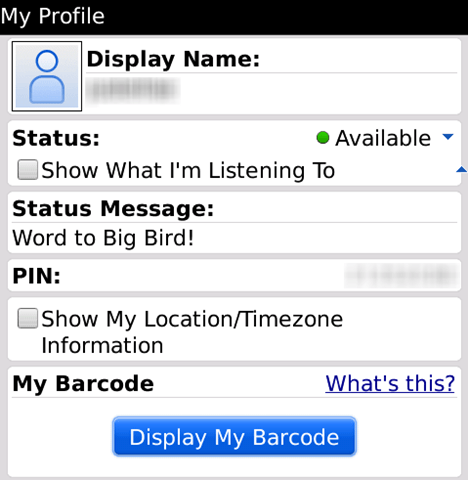
Like most other instant messenger applications, you can customize your display name, add a profile picture, show what song you are listening to, update your status message, and show your location (which is updated by GPS if your device has it built in). You can send your location directly to another contact by selecting Send Location… from the menu when you are in a chat with one of your contacts. If you're waiting for a friend at a restaurant and they get lost, you can send them your location so they can find you more easily.
What truly distinguished Blackberry Messenger from other instant messengers is its ability to have a secure group Conference with multiple contacts. This business-friendly feature allows you to have secure conversations with multiple coworkers to get work done on the go. If you will need to chat with the same group of people repeatedly, you can show the group on the Home Screen. This way the group chat acts like an application of its own, and you will not have to create the group chat over and over again. Blackberry Messenger is an extremely useful tool for both business and personal use. It combines the convenience of instant messenger with the security of the Blackberry platform. It is available from Blackberry App World for free. Version 5.0 requires Blackberry OS 4.5 or higher.
Related postsCopyright © 2007 Online Tech Tips. Aseem Kishore (digitalfingerprint: a59a56dce36427d83e23b501579944fcakmk1980 (209.85.224.85) ) Post from:
|
| 3 Last-Minute Holiday Greeting Cards You Can Make Online Posted: 21 Dec 2010 03:21 AM PST The holidays come at the same time every year, yet many of us still forget to send our holiday greetings in time for them to arrive before the holidays. Luckily, the internet embraces and rewards procrastinators with many last-minute options. Here are a few ways to make and send last-minute greetings: 1. GotFreeCards.com
If you need a holiday greeting to attach to a gift, or a card to send to someone who sent you a card, but you forgot to send them one, GotFreeCards.com is a life-saver. Instead of just the standard E-card online greeting, GotFreeCards.com has printable, store-quality cards. So long as you have card stock and color printer ink, you can print a last-minute card. Besides the standard greetings, GotFreeCards.com allows you to add stickers, custom text and even photographs to customize the card.
2. YouTube-cards.com
YouTube videos can make great holiday greetings, since there is something on YouTube that will appeal to nearly anyone. Sending a video in the form of a holiday e-greeting is easy. Go to YouTube-cards.com and search for a video. Once you find one that suits your personality and the holiday in question, click the e-card button on the right and enter your, and your recipients' information. We chose our favorite Christmas carol.
3. Critter CarolsOf course, if you forgot to send holiday greetings, you can always claim the dog ate them (hey, it worked for homework, right?). To make sure Fido is truly sorry for his fictitious misdeed, immortalize in a Critter Carol. This service works just like OfficeMax's Elf Yourself, only for pet photos. Upload your favorite pictures of Fido and Fluffy, then choose a holiday carol for them to sing to your friends.
There are many online ways to salvage your holiday dignity, even at the last minute. With a little tech-savvy and creativity, no one need know you created your greeting the day before (or the day of) the holiday.
Related postsCopyright © 2007 Online Tech Tips. Aseem Kishore (digitalfingerprint: a59a56dce36427d83e23b501579944fcakmk1980 (209.85.224.85) ) Post from:
|


| You are subscribed to email updates from Online Tech Tips To stop receiving these emails, you may unsubscribe now. | Email delivery powered by Google |
| Google Inc., 20 West Kinzie, Chicago IL USA 60610 | |
How to Keep a Bathroom Warm in Winter
 |  |  |  |  |  | | ||
 |  | eHow Of The Day How to Keep a Bathroom Warm in Winterby Murray Anderson Doesn't the idea of a nice, long, warm bath or shower sound great-particularly on a cold winter morning? However, if your next thought is how awful it will feel to step out of that hot water into your cold bathroom-there's some hope for you. Here's some ideas on how you can keep your bathroom experience cozy and warm on even the coldest winter days-and none of them involve the time or expense of doing a bathroom renovation.…Keep reading More Like This | Advertisement Featured Member Articles You Should Follow Us!
|  | |


